Inventory · Article 07
Scrap
Applies to Odoo 19 · 20
Damaged, expired or destroyed goods are removed from stock as scrap. Odoo moves them to a scrap location, and the journal entry moves their cost to expenses. Scrap is done directly from stock or from a transfer in progress.
When to use
- The goods were damaged in the warehouse.
- The products have expired.
- The goods broke during loading or picking.
- The goods are destroyed based on a destruction report.
Before you start
- Products have a cost, and the category has the expense account: see Configuration.
- You have the signed finding or destruction report.
Steps in Odoo
1. Create the scrap
In Inventory › Operations › Adjustments › Scrap, click New.
2. Fill in the product and quantity
Choose the product, the quantity and, for lot-tracked products, the lot. Check the location the goods leave from and Scrap Location.
Odoo 20
Scrap is a stock move. The replenishment tick appears with the untranslated label Should Replenish.
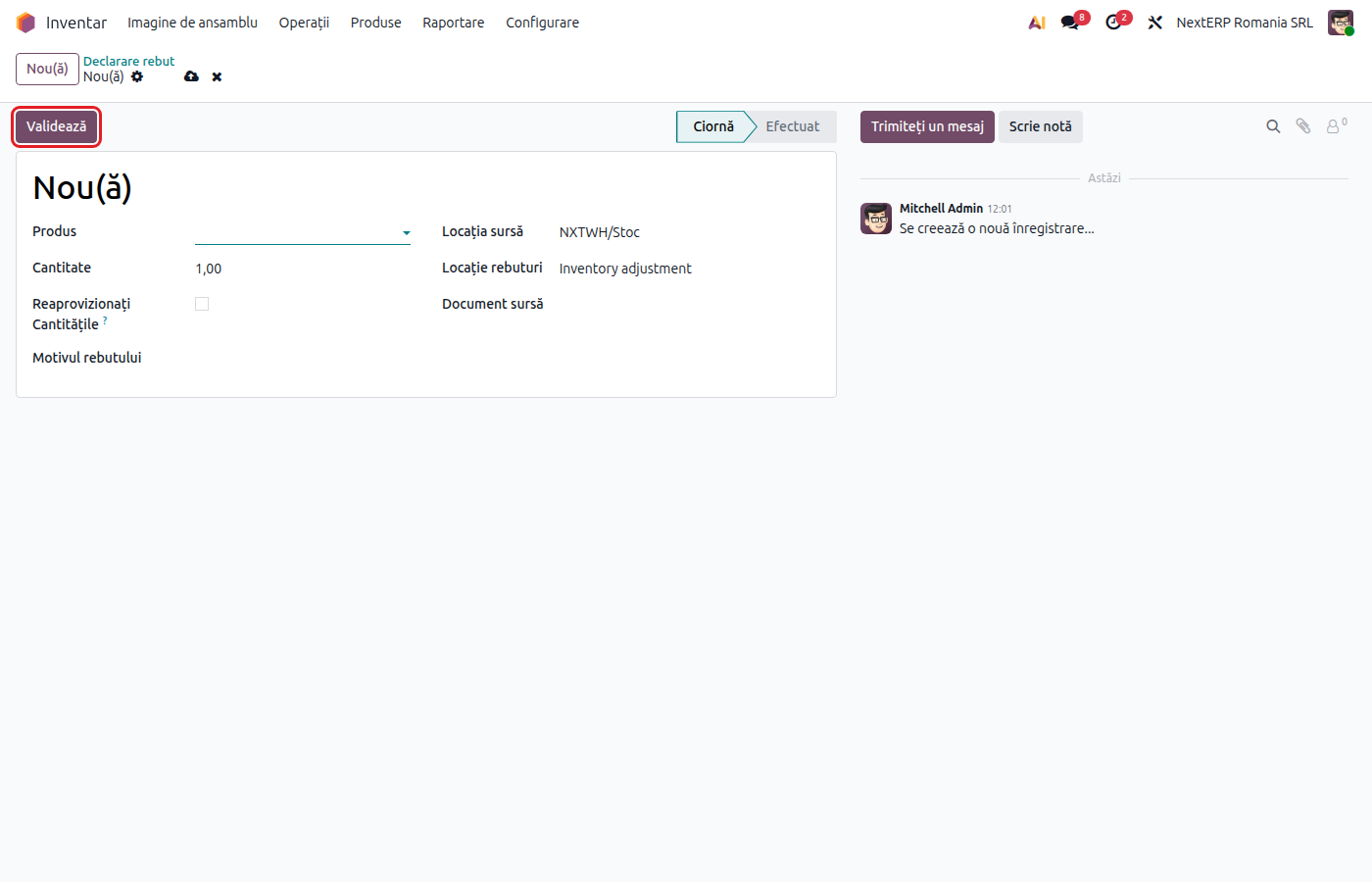
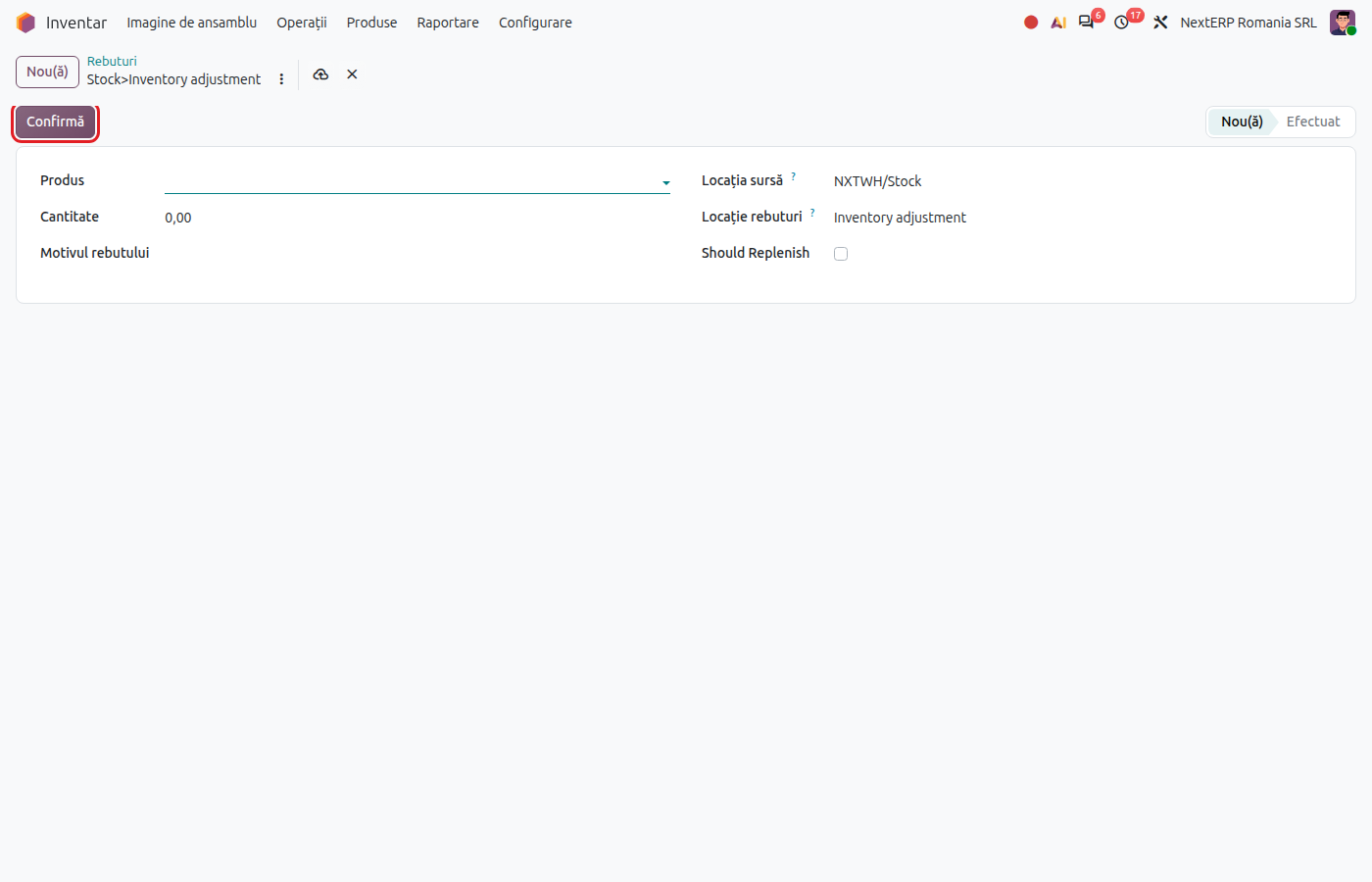
3. Validate
Odoo 19
Click Validate.
Odoo 20
Click Confirm.
The goods leave stock at cost, and Odoo creates the journal entry on the expense account.
Variants
Scrap from a transfer
On an open receipt, delivery or internal transfer, choose Scrap from the actions menu (the gear icon). Choose the transfer's product and the quantity, then click Scrap Products.
Scrap in manufacturing
Scrapping components or finished goods on a manufacturing order is described in the Manufacturing chapter, article Scrap and by-products.
Scrap at receipt, due to the supplier
Goods damaged in transport that the supplier takes back are not scrap: make the return to the supplier, described in the Purchases chapter.
Common mistakes
- Scrap from the wrong location. Stock decreases in another stock unit. Check the source location before validation.
- Scrap used for inventory differences. Shortages found during inventory are recorded from the physical inventory: see Physical inventory.
- Scrap without a report. The expense may be non-deductible. Keep the document on file.
For the accountant: journal entries, tax aspects
Journal entries
Example: goods of 400 lei removed from stock.
| DEBIT | CREDIT |
|---|---|
| 607 — 400 | 371 — 400 |
The expense account is the product category's account (or the one filled in on the location the goods leave from, if you use accounts per location). If your policy requires another account (for example 6588), the accountant reclassifies it through a manual entry.
Tax aspects
- The expense for destroyed goods is deductible if the conditions in Codul fiscal (the Romanian Fiscal Code) are met (for example, goods with degraded quality, with a destruction or downgrading report); otherwise it is non-deductible for corporate income tax.
- For goods destroyed for non-chargeable reasons without supporting documents, the deducted VAT may have to be adjusted. The accountant makes the VAT entry manually; scrap does not generate it.