Receipts, payments and bank · Article 07
Payment differences
Applies to Odoo 19 · 20
Sometimes the customer pays a few lei less (their bank's fee, a rounding) or more than the invoice. If the difference will not be recovered, the invoice is closed in full and the difference is recorded on an expense or income account. Without this step, the invoice stays open with a small amount that nobody follows up anymore.
When to use
- The customer paid 1,200 lei instead of 1,210 lei, and the difference will not be collected.
- The customer paid a few lei more and you do not give the money back.
- You paid a vendor a rounded amount.
Before you start
- The invoice is posted, and the amount paid is known (from the statement or from the customer).
- The accountant has set the account for small differences: usually 65881 (other operating expenses) and 7588 (other operating income).
Steps in Odoo
1. Open the payment from the invoice
On the invoice click Pay: see Recording a payment or receipt.
2. Enter the amount actually paid
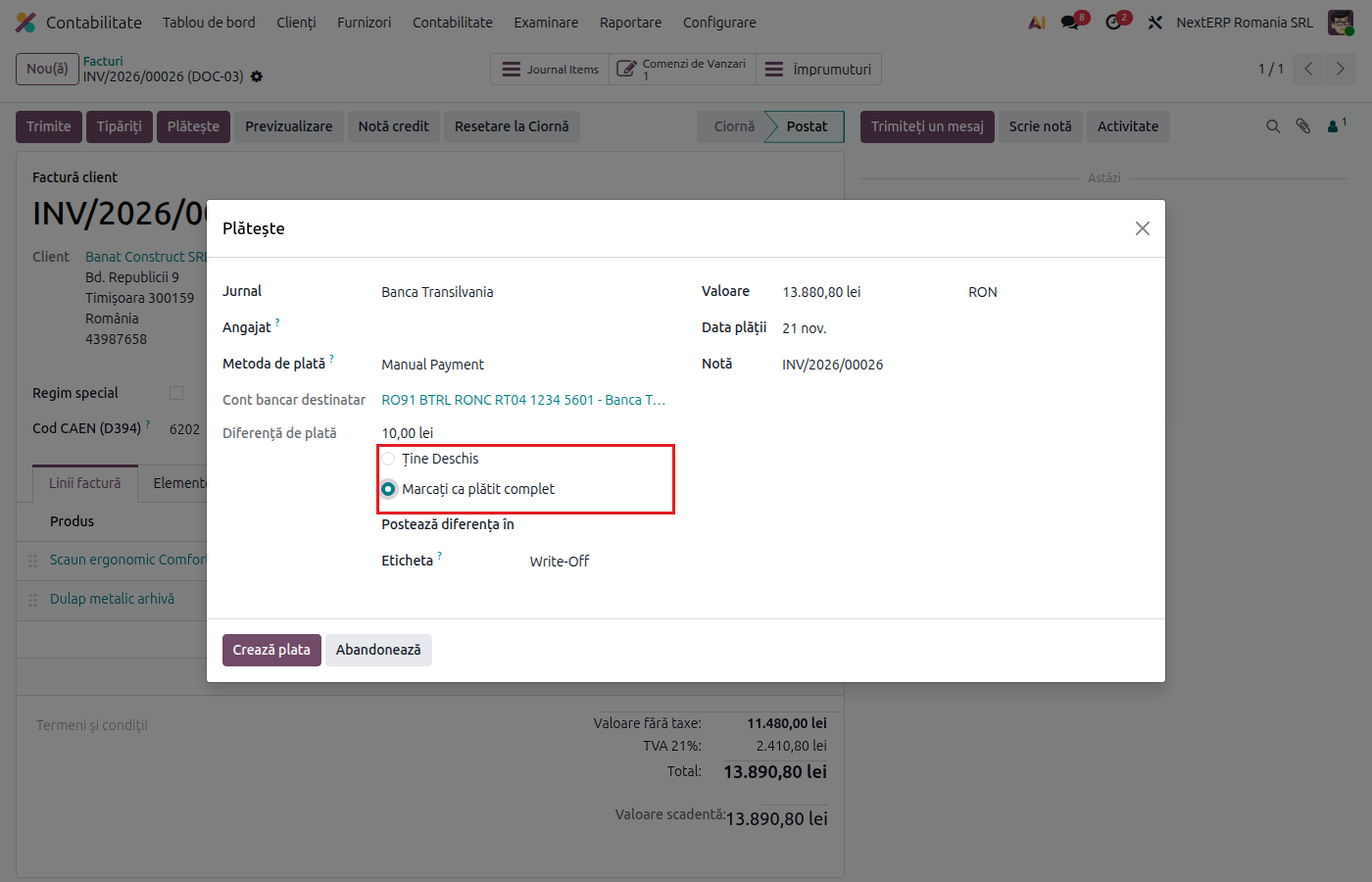
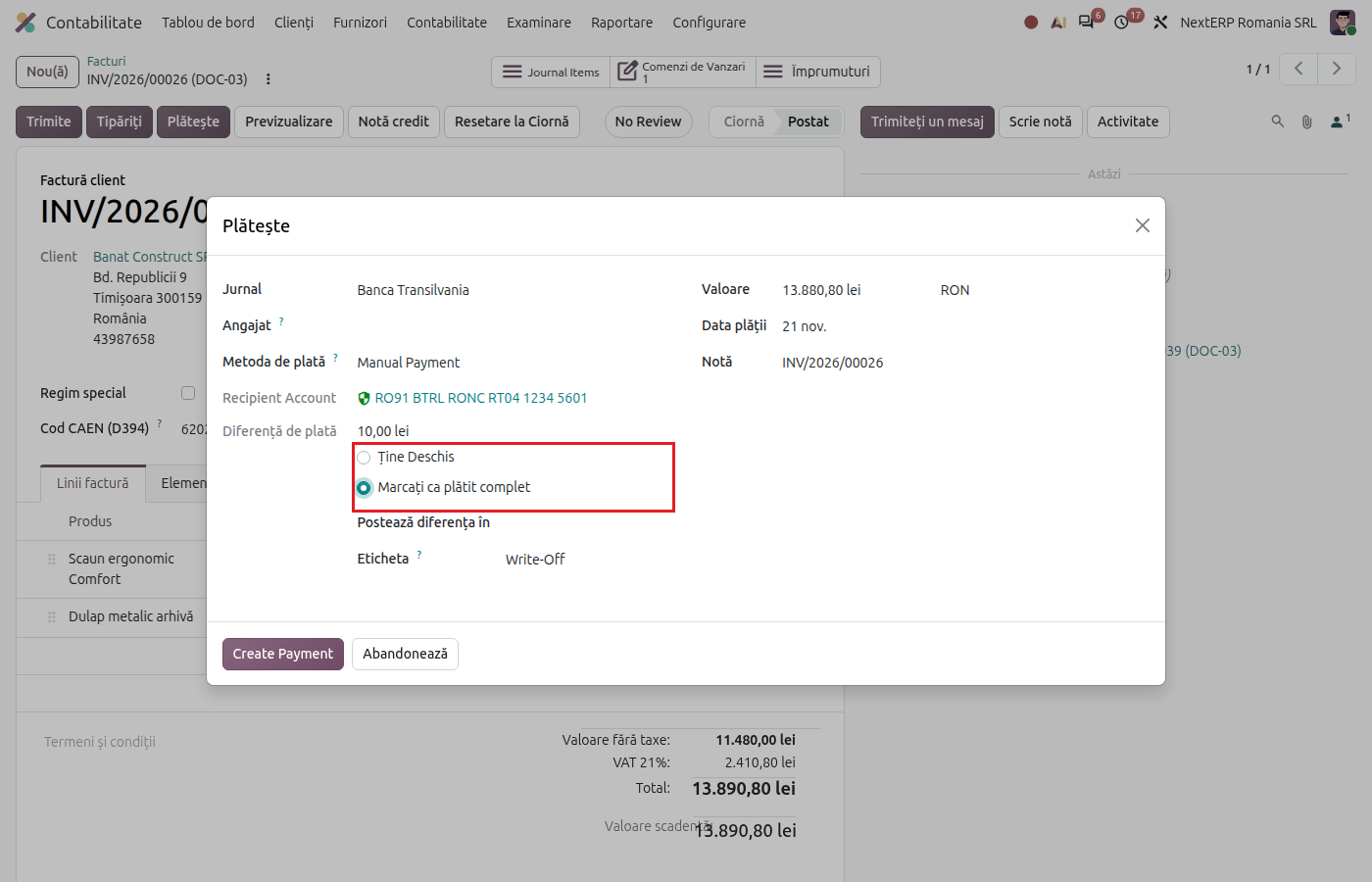
In Amount enter the amount received (for example 1,200 lei). Below the amount, Payment Difference appears.
3. Close the invoice in full
Choose Mark as fully paid. In Post Difference In choose the differences account, and in Label enter the reason (for example "receipt difference").
4. Create the payment
Click Create Payment. The invoice is closed in full; the difference is recorded on the chosen account.
Variants
The difference appears only at bank reconciliation
If you match the statement transaction directly with the invoice and the amount differs, put the difference on an account from the reconciliation window, with Set Account. See Bank statements: import and reconciliation.
Discount for early payment
If the customer is entitled to a discount for paying early, use the payment term with Early Payment Discount, not a payment difference. A trade or financial discount that affects VAT is made with a credit note (Sales and invoicing chapter, article Returns, credit notes and cancellations).
The difference remains to be collected
Choose Keep open: the invoice keeps the remaining amount due, and the customer receives a reminder for it.
Common mistakes
- Large amounts closed as a difference. The payment difference is for insignificant amounts. A discount granted to the customer is made with a credit note, with the VAT adjustment.
- Difference put on 667 (discounts granted). A cash discount is a financial reduction granted through a document; an incomplete payment is not a discount.
- Exchange difference treated as a payment difference. On foreign currency invoices, Odoo records the exchange difference on its own; do not close it manually.
For the accountant: journal entries, returns
Legal framework
- OMFP 1802/2014 (the Romanian accounting regulations order) — other operating expenses (658), other operating income (758).
Journal entries
Example: invoice of 1,000 lei + VAT 21% = 1,210 lei.
The customer pays 1,200 lei, the 10 lei difference is closed:
| DEBIT | CREDIT |
|---|---|
| 5121 — 1,200 65881 — 10 |
4111 — 1,210 |
The customer pays 1,215 lei, the 5 lei difference stays with the company:
| DEBIT | CREDIT |
|---|---|
| 5121 — 1,215 | 4111 — 1,210 7588 — 5 |
The payment difference does not change the tax base or the VAT of the invoice. Whether the expense is deductible for profit tax is decided by the accountant (account 65882 for non-deductible expenses).
Link with the ANAF returns
| Return | What it takes |
|---|---|
| D300 / D394 (the VAT return / the informative return on domestic supplies and purchases) | nothing: the difference has no VAT |
| D101 (the annual profit tax return) | the expense or income, in the taxable result |
| D406 (SAF-T) | the payment entry, with the difference line |