Returns setup · Article 07
D406 SAF-T codes
Applies to Odoo 19 · 20
In the D406 file, each journal item with a tax has a SAF-T code (for example the VAT codes, with TaxType 300). The codes come from the declarations server, with default links to the taxes and tags of the Romanian chart of accounts. In Odoo you link only the company's own taxes or tags.
When to use
- You created your own tax that is not linked to any SAF-T code.
- The D406 validation reports lines without a tax code.
Steps in Odoo
1. Open the codes
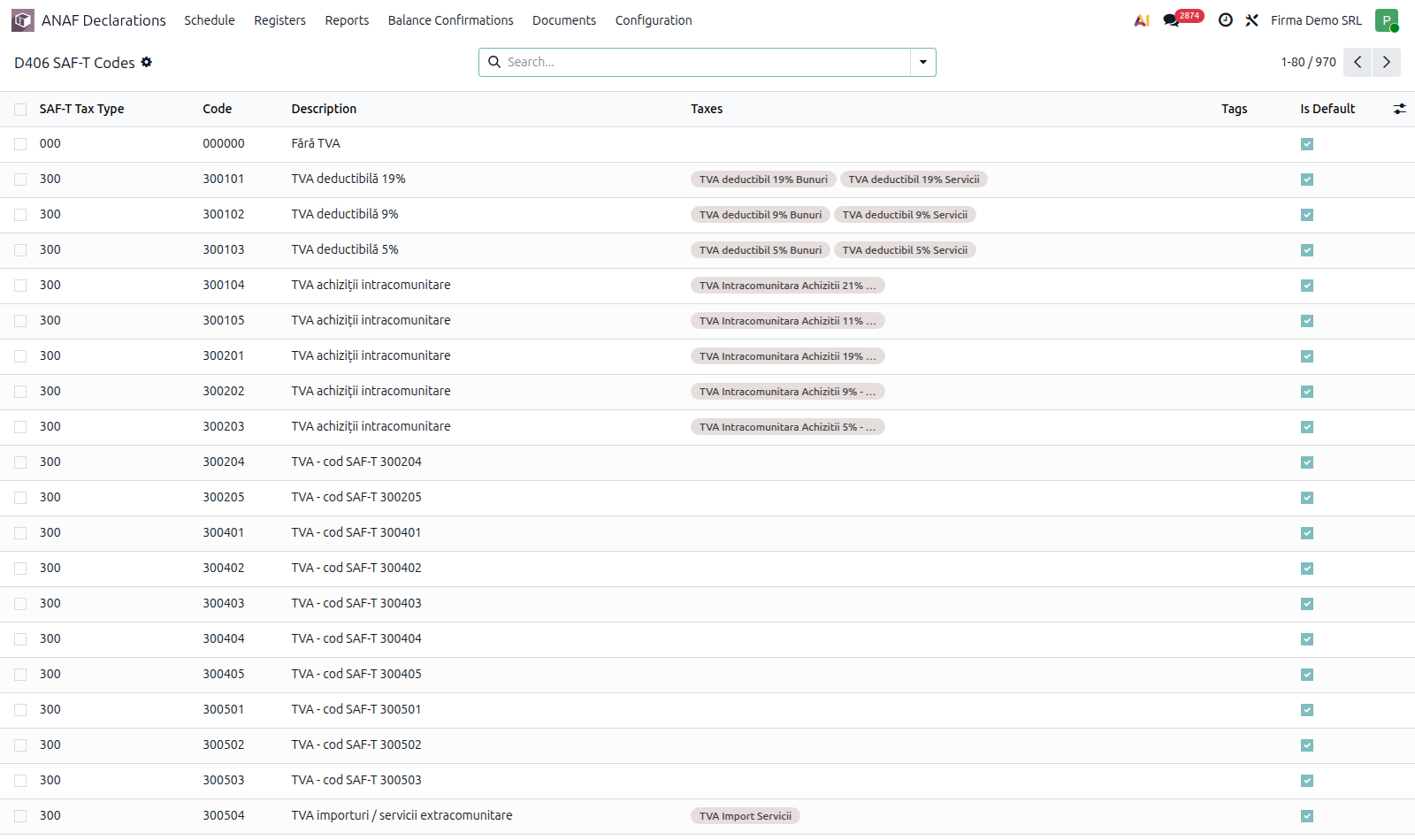
ANAF Declarations › Configuration › Accounting › D406 SAF-T Codes. The list shows the Code, SAF-T Tax Type, Description and whether the link is the default one. If the list is empty, synchronise the company's returns from Declarations and Registers.
2. Link the taxes or tags
Open the code and add in Taxes the taxes whose journal items report this code, or the tax or account tags that identify it.
3. Check on D406
Generate the D406 file for a month and look at the Summary tab (see D406 - SAF-T).
Common mistakes
- New tax not linked. Items with a tax without a SAF-T code fail the D406 validation.
- The same code on two taxes with different rates. Each rate has its own code.