Returns setup · Article 05
Return signatures
Applies to Odoo 19 · 20
The signature is the person (or company) entered as declarant in the return file: name, position and CNP or CUI. The company has a default signature, set on each new return; on a given document you can change it.
When to use
- You set up the company for the first time.
- The administrator or the person preparing the returns changes.
- The returns are filed through an authorised accountant or an accounting firm.
Steps in Odoo
1. Open the signatures
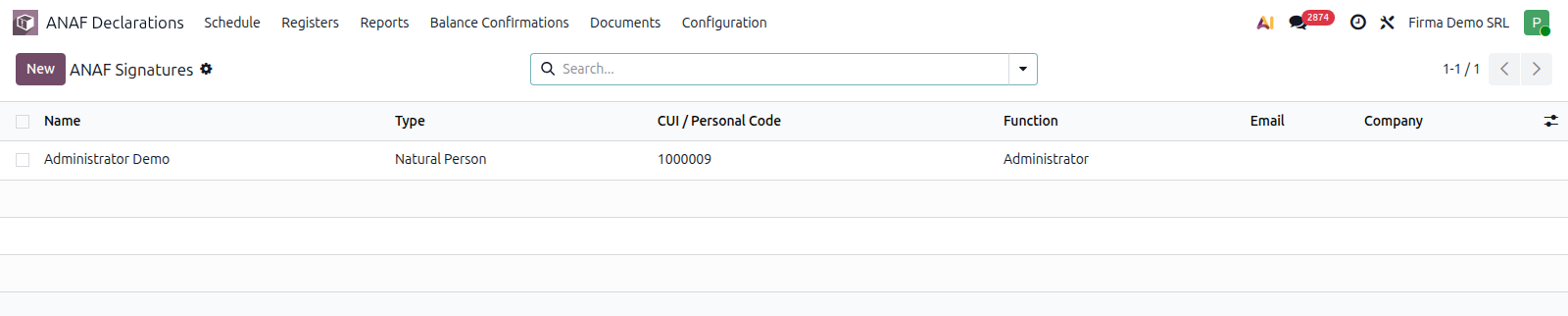
ANAF Declarations › Configuration › General › Signatures.
2. Add the signature
Fill in Type (Natural Person or company), First Name and Last Name, Function, CUI / Personal Code (CNP for a person, CUI for a company) and Email. With Company empty, the signature is available to every company.
3. Choose the company's default signature
In Accounting › Configuration › Settings, the ANAF Company Parameters block, the Default ANAF Signature field chooses the signature used on new returns. On a return document, the Signature field can be changed before generating the file.
Common mistakes
- Signature changed after filing. Documents already filed keep the signature they were generated with.
- Missing CNP or CUI. The file does not pass ANAF validation without the declarant's code.
What the header configuration requirement checks: Company data, signatory and period.