ANAF returns · Article 20
D406 - SAF-T
Applies to Odoo 19 · 20
D406 (SAF-T, the Standard Audit File for Tax) is the standard tax audit file: it contains the chart of accounts, partners, products, journal entries, invoices and payments of the period. Unlike the other returns, D406 has no lines to compute: Odoo extracts the data from accounting, the declarations service builds the file, and Odoo compares it with its own totals before filing. The schedule, filing and marking as filed are those in How to file a return.
When to use
- You file the SAF-T file monthly or quarterly, according to your VAT frequency.
- ANAF has asked you for the stock file.
- You file the annual assets (fixed assets) file.
Before you start
- The SAF-T data are filled in on the fiscal profile: the accounting basis and the entity type (company, division, branch).
- The SAF-T tax codes are linked to the Odoo taxes in ANAF Declarations › Configuration › Accounting › D406 SAF-T Codes. Taxes from the Romanian chart of accounts already have their codes linked; check the taxes you created manually.
- Partners have a country and tax ID; products have the correct unit of measure.
Steps in Odoo
1. Open D406 from the schedule
ANAF Declarations › Schedule, click D406 and then Declaration. On the schedule card, the section field shows which file you are preparing: Monthly / Quarterly, Stocks (on request) or Assets (yearly).
2. Generate the file
Click Generate. Generation can take a few minutes for a month with many records. The validation result appears at the top of the document, and the file can be downloaded with Download.
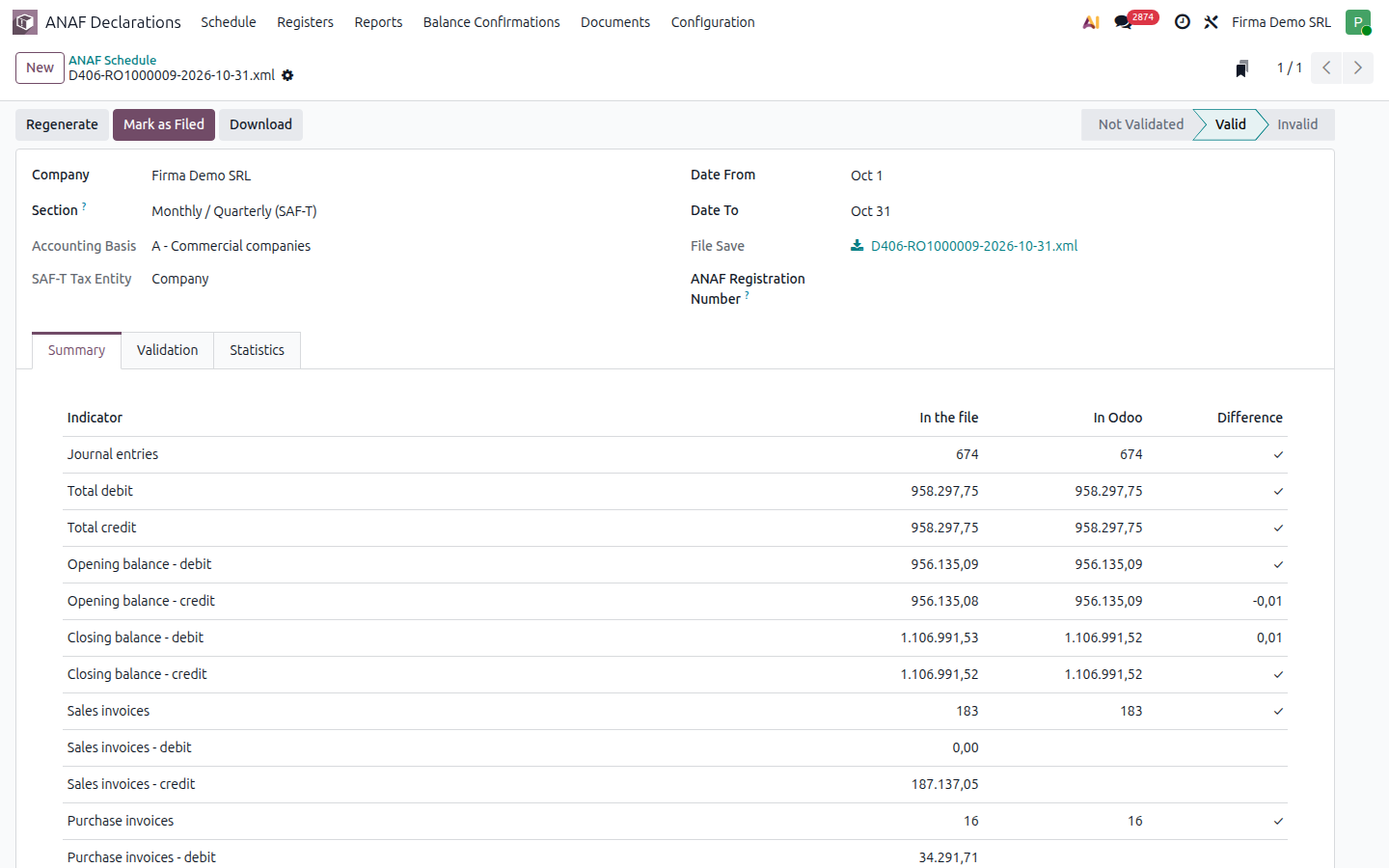
3. Compare the summary with Odoo
The Summary tab puts side by side, on the same lines, what is in the file and what is in Odoo: total debit and credit, opening and closing balances, sales and purchase invoices, payments. The difference column must be zero. Accounts with a balance in Odoo that are missing from the file also appear here.
4. Correct and regenerate
If the validation or the summary shows problems, correct the data in Odoo and click Regenerate. The validation details are in the Validation tab.
5. File and mark as filed
File the document with ANAF, enter the registration number and click Mark as Filed.
Variants
The stock file
It is generated only at the request of ANAF, with the Stocks (on request) section. It is available when you use the Inventory module with stock valuation in accounting.
The assets file
It is generated yearly, with the Assets (yearly) section, from the fixed asset register (that of Odoo Enterprise or of the localization). A value increase is reported together with the original fixed asset.
Form versions and what changed in each: the page D406 — versions.
Common mistakes
- Differences in the summary. They usually come from entries posted after generation or from manual entries without a partner on receivable and payable accounts. Correct and regenerate.
- Tax without a SAF-T code. Validation rejects the file. Link the tax to the right code in D406 SAF-T Codes.
- Partner without a tax ID or country. Validation flags the partner. Complete the partner form.
For the accountant: legal framework and reconciliations
- The periodic D406 file is filed by the last day of the month following the reported period, with the frequency of the VAT return. The stock file is filed at the request of ANAF, and the assets file together with the annual financial statements.