Start here · Article 05
Opening balances
Applies to Odoo 19 · 20
When you go live on Odoo, the balances from the old accounting are taken over at the start date: the opening trial balance, the customer and supplier balances per partner and the stock per product. The trial balance is entered through an opening journal entry, the stock through the initial inventory. At the end, the trial balance in Odoo must be identical to the one in the old system.
When to use
- You go live on Odoo at the start of a year or a month.
- You take over customer and supplier balances, so that you can match the receipts and payments that come after the start.
- You take over the stock in quantity and value.
Before you start
- You have the trial balance from the old system at the start date, per sub-account, plus the list of unpaid customer and supplier invoices.
- Partners and products are imported: see Data import.
- The accounts in the old trial balance exist in Odoo: see Chart of accounts, journals and taxes.
Steps in Odoo
1. Create the opening entry
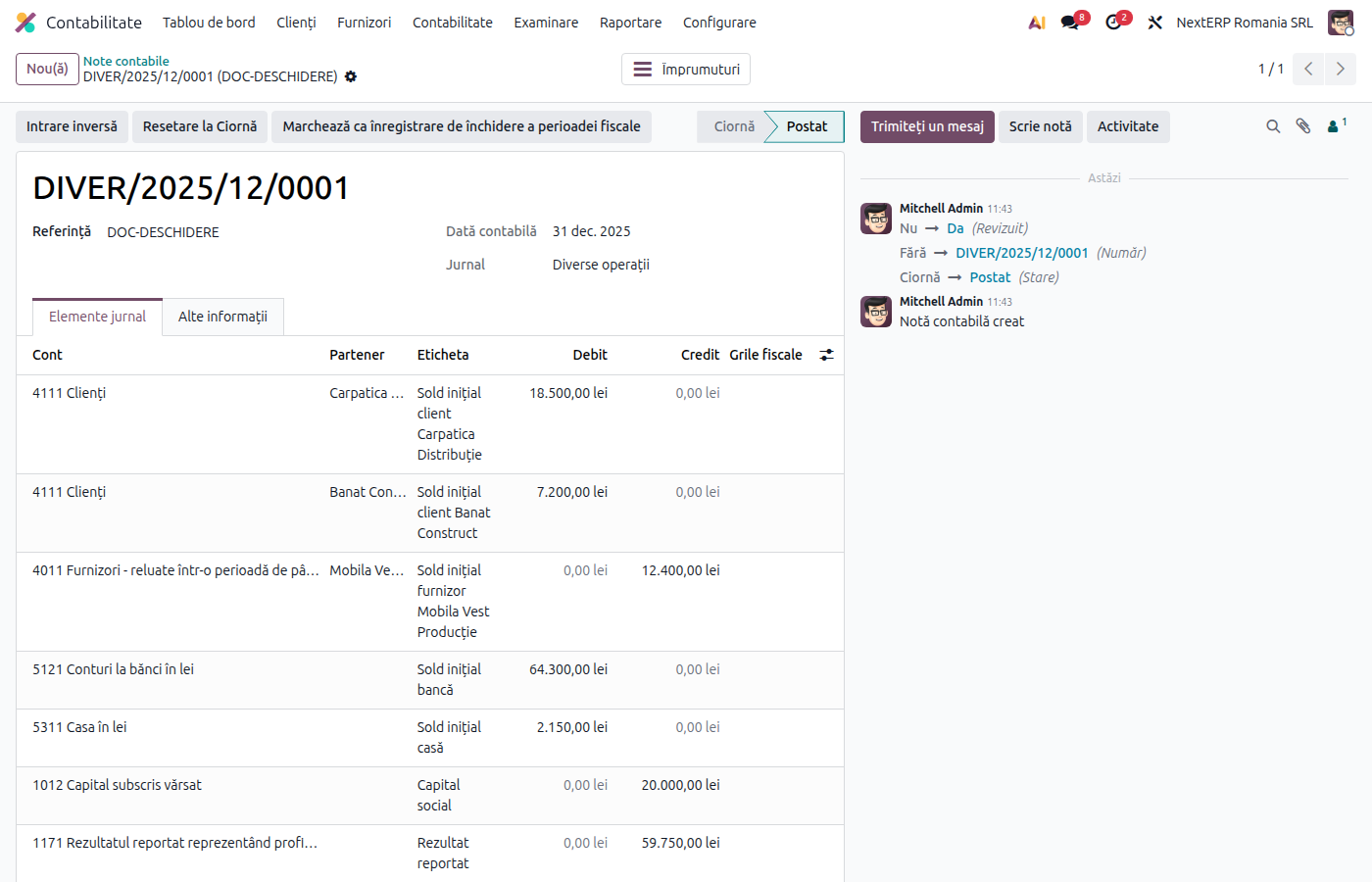
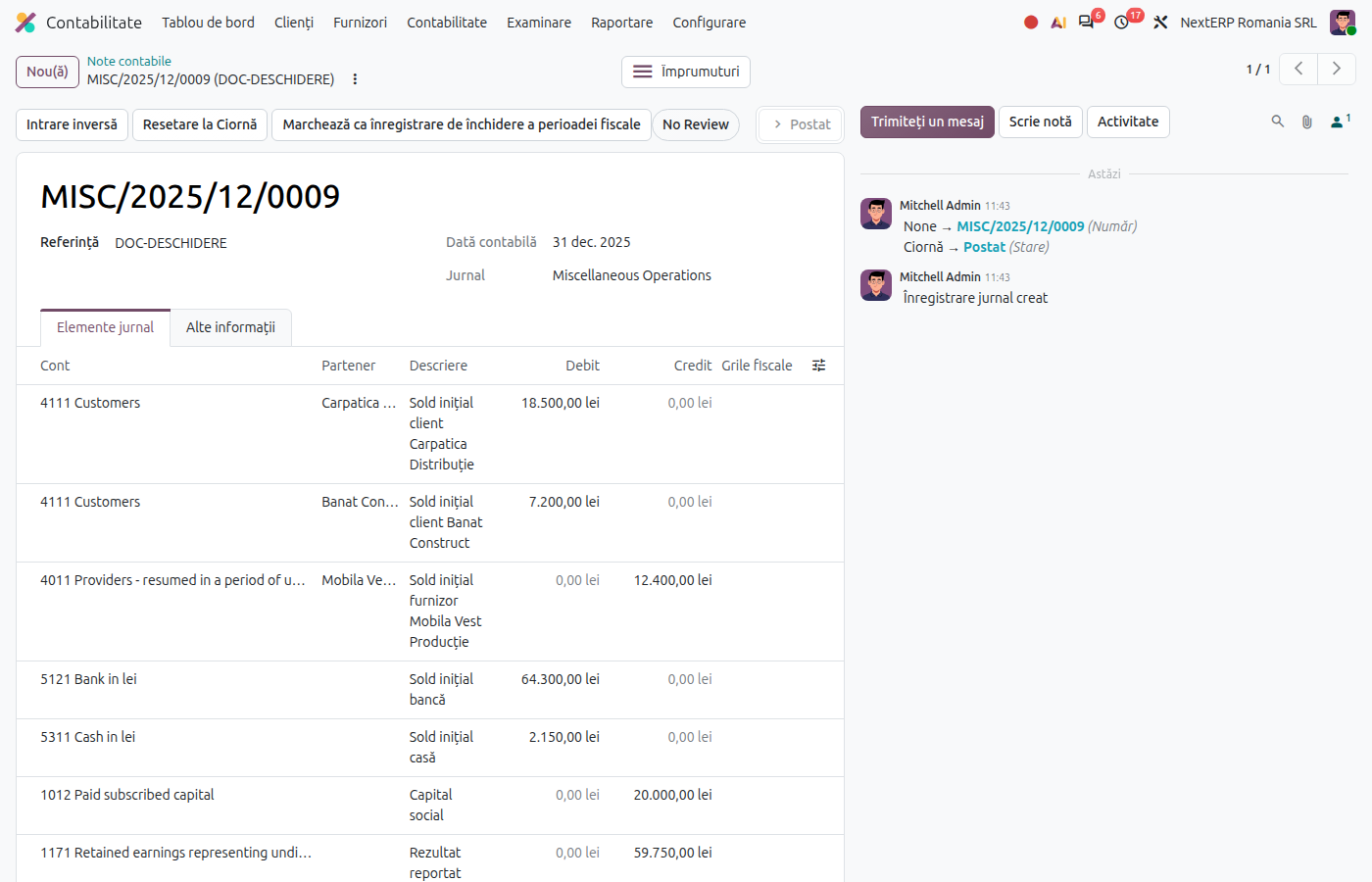
Accounting › Accounting › Transactions › Journal Entries, click New. Choose the Miscellaneous Operations journal (or a separate journal for the opening) and, as Accounting Date, the day before the start date (for example 31 December for a start on 1 January).
2. Enter the account balances
Add one line for each account in the trial balance, with the closing balance in Debit or Credit. For many accounts, import the lines from Excel, as in Data import.
3. Enter the partner balances per partner
For customers (4111), suppliers (401) and advances (419, 409), do not enter a global balance: add one line for each open invoice, with Partner and, in Label, the invoice number. The lines will then be matched with the actual receipts and payments.
4. Post the entry and check the balance
The entry must be balanced (total debit = total credit, without stock if you take it over through the inventory, see step 5). Click Post.
5. Take over the stock
Enter the quantities per product and location through the initial inventory, as in the Inventory chapter, Physical inventory article. The value of each product must be the cost from the old records.
6. Compare the trial balance
Odoo 19
Open Accounting › Reporting › Ledgers › Trial Balance at the start date.
Odoo 20
Open Accounting › Reporting › Ledgers › Trial Balance at the start date.
The balances must be identical to the old trial balance. Also check the partner balances in Reporting › Partner Reports, and the stock value against the 3xx accounts.
Variants
Foreign-currency balances
On the foreign-currency customer, supplier and bank lines, also fill in the amount in currency, not only in lei. Otherwise the month-end revaluation does not work for them.
Bank and cash
The 5121 and 5311 balances go into the opening entry. The first statement imported into Odoo must start from the same balance.
Start during the year
The turnover of the previous months is not taken over in the opening entry, only the balances. For the annual reports (D101, the corporate income tax return; the Bilanț, the annual financial statements) the turnover from the old system is added separately; discuss with your consultant how to take it over.
Common mistakes
- Customer or supplier balance without a partner. The partner reports are empty and receipts have nothing to settle. Each open invoice on a separate line, with a partner.
- Stock taken over twice. If the stock comes in through the inventory, do not also put the 3xx accounts in the opening entry (see For the accountant).
- Stock value different from the 3xx balance. Usually a wrong cost on a product or a wrong quantity. Correct it before the first sales.
- VAT taken over wrongly. The 4426 / 4427 balances at the start date must match the last VAT return filed; the non-chargeable VAT (4428) is taken over only for invoices still unpaid.
- Lock date set before the opening. The opening entry can no longer be posted. Lock the period only after you have finished the takeover.
For the accountant: the opening entry and the stock
The opening entry
Simplified example, without stock:
| DEBIT | CREDIT |
|---|---|
| 4111 — 50,000 (per partner) 5121 — 30,000 5311 — 2,000 |
4011 — 40,000 (per partner) 1012 — 30,000 1171 — 12,000 |
Total debit 82,000 = total credit 82,000. Equity and retained earnings are taken from the old trial balance, not calculated.
Stock taken over through the inventory
In the Romanian localization, the inventory receipt (inventory surplus) is recorded in red (negative) on the expense account of the product category, against the stock account. Example, goods of 80,000 lei:
| DEBIT | CREDIT |
|---|---|
| 371 — 80,000 607 — −80,000 |
So that 607 does not keep a balance, the opening entry puts the amount on 607 instead of the stock account:
| DEBIT | CREDIT |
|---|---|
| 607 — 80,000 | (the counterparts from the trial balance) |
After both entries, 371 has a balance of 80,000 lei and 607 has a zero balance. Check the expense account of each category (for example 601 for raw materials, 607 for goods).
Link with the ANAF returns
The opening entry is not included in D300 (Decont de TVA, the VAT return) and D394 (the domestic sales and purchases informative return). In D406 (SAF-T), the opening balances of accounts and partners come from this entry.