Cash register and POS · Article 03
Sale, return and invoice at the register
Applies to Odoo 19 · 20
At the register the cashier scans the products, collects cash, card or a combination, and the cash register prints the fiscal receipt. If the customer asks for an invoice, you issue it for the same sale, without collecting a second time. A return starts from the original receipt and is documented with a credit note.
When to use
- You sell in the store, at the counter, to final consumers.
- You collect cash, card, vouchers or a combination.
- The customer asks for an invoice in their own name or in their company's name.
- The customer brings back a product bought at the register.
Before you start
- The sales session is open, as in The sales session.
- The payment methods have the FisCool mapping, as in Connecting the cash register and the terminal.
- Products have the correct VAT tax (21%, or 11% for products with the reduced rate).
Steps in Odoo
1. Add the products
Scan or search for the products on the register screen. For an invoice, choose the customer before payment.
2. Collect payment
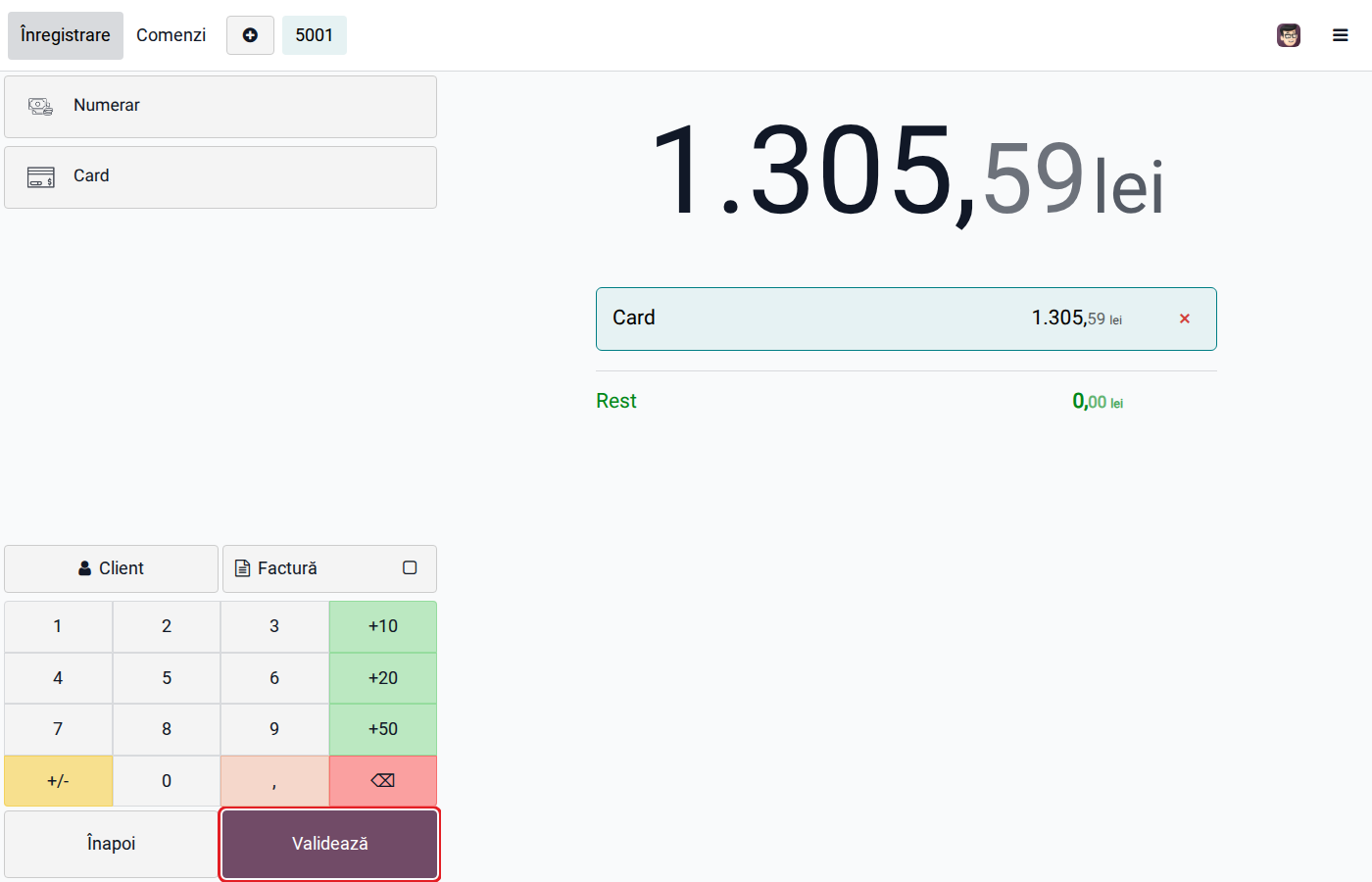
Click Payment, choose the method (or several, for a split payment) and click Validate. For a card payment on a separate terminal, the screen waits until the customer pays at the terminal; the receipt is printed only after the bank approves. A declined card leaves the order unvalidated, with no receipt.
3. Issue the invoice, if the customer asks for it
Odoo 19
On the receipt screen click Generate Invoice. If the receipt has no customer, Odoo opens the customer list so you can choose or create one. The invoice is issued for the order already paid, without collecting a second time.
Odoo 20
On the payment screen, before Validate, click Invoice and choose the customer. The invoice is issued when the payment is validated.
For a customer with a VAT number, selected at payment for an invoice, the cash register prints the receipt with the buyer's tax code.
4. Take a return
Open Orders on the register screen, search for the original receipt, choose the returned products and click Refund. Odoo asks for the customer from the start: the return cannot be validated without one.
5. Give the money back
Click Payment, choose the method used to return the money and click Validate. Odoo issues the credit note on the customer and, for cash, the cash payment voucher (dispoziție de plată), which the customer signs. The return is not sent to the cash register: a fiscal receipt can only record a sale.
Variants
Card payment on a register with a built-in terminal
The cash register handles the card payment by itself and answers at the end. For the cashier the flow is the same.
Card charged, receipt not printed
If the printer fails between the card payment and printing the receipt, the cashier sees on screen the amount and the transaction references. The money has been collected: do not ask for the card a second time. Fix the register and resume printing, or void the transaction at the terminal with those references.
Company customer
For buyers with a CUI (Romanian company tax code), issue the invoice on the CUI. The invoice is sent to e-Factura (the national e-invoicing system), like any invoice to a Romanian company.
Common mistakes
- Sale without a fiscal receipt. Every receipt of money from individuals is made with a receipt from the cash register; Odoo does not replace the register.
- New invoice instead of the invoice from the receipt. An invoice issued separately, from Sales, for a receipt already recorded doubles revenue and VAT. Issue the invoice from the register.
- Cash payment above the ceiling. Odoo warns when a cash payment exceeds 5,000 lei and does not allow cash sales above 10,000 lei.
- Return without the original receipt. Always start the return from the original order, so that the credit note takes the prices and taxes of the sale.
- Unsigned cash payment voucher. Print it and ask for the customer's signature at every cash refund.
For the accountant: legal framework, journal entries, returns
Legal framework
- OUG 28/1999 (the emergency ordinance on electronic fiscal cash registers) — the obligation to issue a fiscal receipt for supplies to final consumers.
- Legea 70/2015 (the law on cash payments) — the ceilings for cash receipts and payments.
- Codul fiscal (Legea 227/2015) (the Romanian Fiscal Code), art. 319 — the invoice issued at the buyer's request; art. 287 — adjustment of the tax base on returns.
Journal entries
The sale and the session closing are described in The sales session. The invoice issued on request for a receipt already paid creates no new revenue: it takes over the sale from the receipt.
Return example: goods costing 800 lei, sold for 1,000 lei + VAT 21%, returned in full, with the money refunded in cash.
When the return is validated — goods back in stock, at cost:
| DEBIT | CREDIT |
|---|---|
| 607 — −800 | 371 — −800 |
The credit note — reversal of revenue and VAT:
| DEBIT | CREDIT |
|---|---|
| 4111 — −1,210 | 707 — −1,000 4427 — −210 |
The cash payment voucher — the cash refund:
| DEBIT | CREDIT |
|---|---|
| 4111 — 1,210 | 5311 — 1,210 |
The refunded amount appears only once in the cash desk: the payment from the voucher is excluded from the session closing entry.
Link with the ANAF returns
| Return | What it takes |
|---|---|
| D300 (Decont de TVA, the VAT return) | output VAT, by rate, including reversals from returns |
| D394 (the informative return on domestic supplies and purchases) | sales with fiscal receipts as a total; invoices issued on request and credit notes, per customer |
| D406 (SAF-T) | closing entries, invoices, credit notes and payments |
| e-Factura | invoices and credit notes issued at the register, not receipts |